We proudly support USARK because ethical husbandry and keeper advocacy go hand in hand. USARK protects the herpetoculture community and our cold-blooded family members through science-based legislation, education, and proactive defense of responsible animal care.
Crocodilian Silicone USB 2.0 Flash Drive
Crocodilian Silicone USB 2.0 Flash Drive
Regular price
$9.00 USD
Regular price
Sale price
$9.00 USD
Shipping calculated at checkout.
Quantity
Couldn't load pickup availability
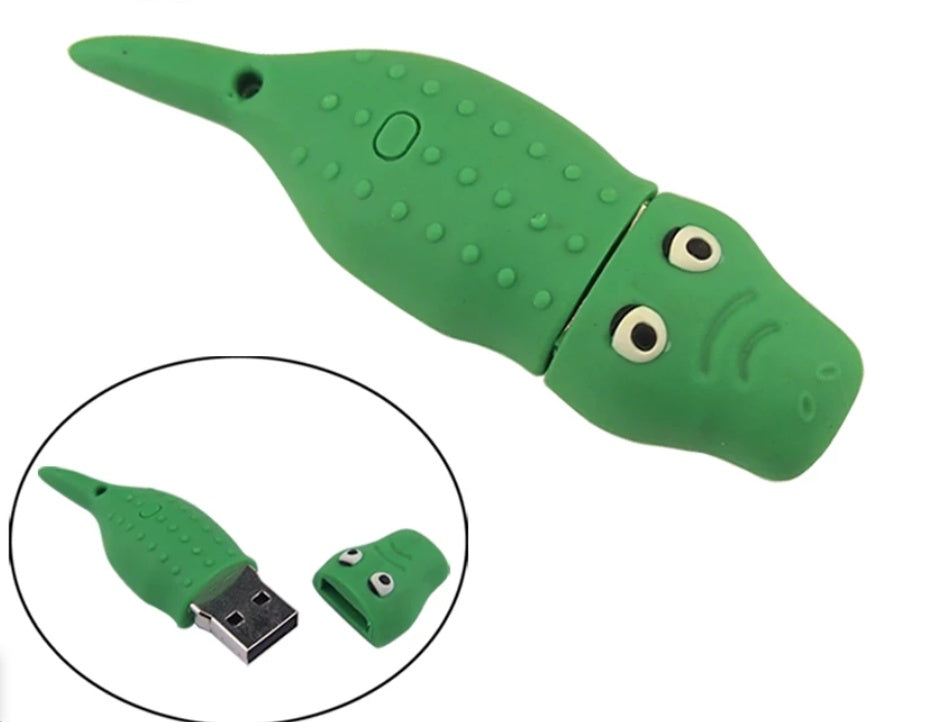
Crafted with a soft, tactile, and shock-absorbing PVC shell, this little case is built to cushion your drive against everyday drops, bumps, and bag clutter. The two-piece snap design keeps the USB connector protected inside the reptile's body when on the go, while an integrated hanging loop near the tail lets you easily secure it to a lanyard, keyring, or zipper pull.
Available in a wide range of capacities from a compact 1GB all the way up to an expansive 128GB, it makes a delightful desk companion, gift, or conversation starter for any reptile or amphibian enthusiast.
Key Features
- Playful Alligator Design: Features a detailed green crocodile aesthetic complete with textured scaly back scales and characteristic yellow eyes.
- Soft PVC Armor: The flexible rubberized PVC shell absorbs impacts and protects internal components from daily wear and tear.
- Secure Two-Piece Fit: The head pulls apart cleanly from the body to reveal the USB interface, keeping dust and pocket lint away from the connector when not in use.
- Built-In Lanyard Loop: Includes an integrated top attachment point so you can clip your gator drive to lanyards, keychains, or bags.
- Extensive Capacity Options: Offered in multiple sizes ranging from light document storage (1GB, 2GB, 4GB, 8GB, 16GB) to large media libraries (32GB, 64GB, 128GB).
Technical Specifications & Size Guide
- Interface: USB 2.0
- Data Transmission Rate: 5 MB/s
- Maximum Read Speed: 12 MB/s
- Maximum Write Speed: 5 MB/s
- Shell Material: Soft-touch PVC
-
Available Capacities: 1GB, 2GB, 4GB, 8GB, 16GB, 32GB, 64GB, 128GB
- Operating Compatibility: Universal Plug & Play across Windows, macOS, and Linux systems (no special drivers required)
Care & Usage Instructions
- Cleaning: Gently wipe the PVC exterior with a damp cloth and mild soap if needed; ensure the drive is completely dry before plugging into a computer port.
- Storage: Keep away from direct high heat and sharp objects to preserve the soft-touch finish.